Today is World book and copyright day. UN mentions a lot about books and the diversity of values they bring along but very few words are written on copyright per se. It’s true that books are vectors of values and knowledge, depositories of the intangible heritage. But in a world progressively going towards digital books, it could be worth having a real debate about what type of knowledge we want to preserve for the next generations, in which formats, under what types of conditions.
I was in New York recently and I was happily surprised to see the number of people still reading something (real books but also magazines, e-books, and of course their e-mails). E-book readers are more and more common, especially in planes and other public transport. Every big book store on 5th Avenue has its own e-reader, even web-based book stores promote their own e-readers. Most if not all of those e-readers promote its own closed, freedom-depriving file format.
We’ve all in mind pictures of the Rose Main Reading Room of the NYPL Schwarzman Building, where the beautiful room is packed with people reading and their laptops. I was also surprised to see the amount of computers available in other rooms (like the Bill Blass Public Catalog Room above). Books – real ones, made of paper and cardboard – are consigned to the walls, very few people are actually browsing through them. We now look for books in electronic catalog ; these books are stored in more functional room for librarians to find them. We now expose our collection of books in “social bookshelves” like librarything.
It’s not a reaction of an old man (well, maybe …). It’s more that we should think about what we want to create and what we want to leave for the next generations. It’s good to have a business plan to allow customers to have the best possible experience while reading your e-books for the next 2 years ; it’s even better if you would allow the same customers to keep their library open, transparent and “sharable” with others. Gutenberg’s invention allowed books and knowledge to be widely shared ; don’t let the “digital revolution” take that freedom back!
It all started with a strong statement in the LA Times:
If early humans had been vegans we might all still be living in caves.
It says nothing and everything at the same time … Not eating meat would have stopped our “evolution” from early humans? Not eating meat would make us dumber? Or does it have something else to do? It does.
The original article on PLoS ONE is in fact a study about the impact of carnivory on human development and evolution. And the method used is a model of weaning in Mammals (thus no intelligence test per se). Psouni and her colleagues showed that:
Brain mass is a better fundamental predictor of time to weaning than is female body mass (figure 2);
Limb biomechanics is a predictor of time to weaning (figure 3);
Dietary profile is a predictor of time to weaning (figure 4) and that
Time to weaning in humans is quantitatively predictable from a carnivorous diet (figure 5).
So eating meat made human women wean more rapidly than if we stayed vegetarian. Their model suggests that “the contribution of carnivory was to shorten the duration of lactation and suckling despite the overall prolongation of development associated with increased adult brain mass”. Nothing about intelligence thus.
However this paper came to my knowledge after OAD published a (quite long) infographics about the dangers of red meat (not meat in general). On the presentation-side, I’m not sure such long vertical banner is powerful enough: after some time you are tired to scroll down. On the content-side, it’s a well-known fact that red meat comes with a lot of healthy risks. On top of that, the infographics focuses a lot on the USA, one of the countries where the consumption of red meat is high. This reminded me a TV programme from Jamie Oliver where he showed how meat is processed in the USA …
It’s “good” to be reminded of all this only once you’ve come back from there …
Key messages? Always read the original paper (even diagonally it’s better than general press) and know what you eat!
Edited on May 12, 2013 to remove the link to the original infographics (as it was not present anymore).
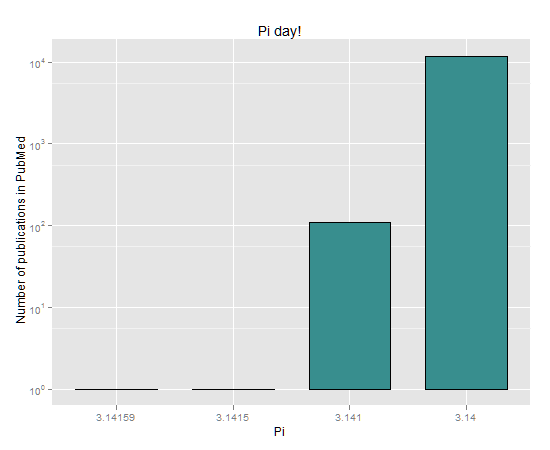
On March 14th, 2012 (3/14/2012), it was Pi day. According to Wikipedia, Pi (π) is a mathematical constant that is the ratio of any Euclidean circle’s circumference to its diameter. While others estimated π using Monte Carlo in R or declared π is wrong, I tried to see how many times the pi value is cited in Pubmed, a database of references and abstracts on life sciences and biomedical topics. And here are the results (please note the log y-axis):
Pi
Occurences
3.14159
1
3.1415
1
3.141
110
3.14
11726
I know it has little meaning: very often the string of numbers in the pi value was not there for pi itself but for other reasons. I thought it was fun, that’s all.
March 7th, 2012 is Holi! It is first a Hindu spring festival celebration but it is also known as the festival of colours. The main day is celebrated by people throwing scented powder and perfume at each other. Bonfires are lit on the eve of the festival (more info on Wikipedia).
Now compare how a movie showed Holi in 1981 (“Silsila“):
With a movie showing a Holi celebration in 2010 (“Action_Replayy“):
🙂
In Belgium, at least two celebrations are planned:
A Java project compilation went berserk and I ended up with a directory structure of more than 260 characters. I stopped the mad process but it already created more than 50 successive duo of path “build/classes” …
Now I had to delete this structure. And, to my surprise, it was impossible. When you try to just press the “Delete” key with the root directory selected in the File Explorer, you get a Path Too Long exception. The reason is that the maximum length of a path according to the Windows API (MAX_PATH variable) is defined as 260 characters. I tried some other methods but all of them failed:
write a small Java program that tried to delete the whole path: Netbeans (Java) was able to create this mess, why shouldn’t another Java program be able to delete it? Impossible.
write a small C++ program that tried to delete the whole path: as long as you stick with the Windows API, it’s impossible (I read that it could be possible using the boost::filesystem library but didn’t try).
try some Portable Apps utilities for file management: impossible (even when the software was using another framework like Qt).
Finally, I just ran a Cygwin terminal, went to the ad hoc location and did a simple “rm -rf libtest“. And voilà. So, next time Windows forbids me from doing something, it might be a good idea to directly rely on a true terminal from a Unix-like environment. I didn’t try a liveCD (I didn’t have such CD to hand) but it might be also possible.
This afternoon I received a bunch of data accompanied by stacked bar graphs for each dataset. For example, this one:
The chart shows the incidence of disease X in various age ranges. That incidence is split by 8 severity levels. The chart shows that the disease especially affects age ranges 4 and 5, at different severity levels. However I didn’t feel comfortable …
what are the different levels of severity in age ranges 1, 2 and 3?
how can we compare levels C, D and E in age ranges 4 and 5?
is there anywhere some severity A?
(it’s even worst when some age ranges don’t have any incidence at all: what is happening?)
This reminded me I read a book written by Steven Few, a few years ago: Information Dashboard Design (O’Reilly Media, 2006). Inside, on pages 135-136, one can read stacked bar graphs are the right choice only when you must display multiple instances of a whole and its parts, with emphasis primarily on the whole. And that this type of graph shouldn’t be used if the distribution changes must be shown more precisely.
If one wants to clearly display both the whole and its parts, Steven Few recommends to either use two graphs next to each other or a combination bar and line graph (with two quantitative scales).
As I’m not really interested in the whole but mainly in the parts and their relative distribution, I suggest another way to present the data. This isn’t really new. Actually everything was already in the table. You just format the table nicely and add some colour gradient. And voilà:
You still see where the incidence is the highest (in age ranges 4 and 5), what levels of severity are the most important (C, with lower but approximately similar levels of D, E and H). In addition to the graph above, one can notice there isn’t any severity levels A, B, F and G represented and we can quickly grasp the proportions between the different incidences.
Of course, if your criteria for “sexiness” is that there shouldn’t be any digit on your chart, then this chart is not sexy. But I find this presentation really more appealing and meaningful than the stacked bar graph. Isn’t it?
For some reasons, I had to choose between a new, simple Nokia phone (but fortunately not a Windows one!) and my 1-year-old Android phone. Before I leave this Android phone, here are the few 6 Android apps that I really appreciated and used daily.
FBReader is a very nice e-book reader for Android. It supports a lot of e-book formats like epub, fb2, (partially) mobipocket, html, RTF and plain text. It works very well with Calibre (a free software e-book reader / manager / converter) – or is it the opposite? I also really like the fact FBReader can browse and download some free e-books directly from the internet. Of course, reading an e-book on a small 3.2 inch screen isn’t the perfect user experience. However, the night mode (white text on black background) is very handy to read something when it’s late and you don’t want the harsh white background. You can find FBReader on the Android Market for free (it’s a free software, under the GPL).
Google Reader is the Android version of the web-based Google Reader. If you follow RSS/Atom feeds with the latter, you will be interested by its Android version. A very nice feature is that all your feeds will be synchronized between the different versions of your Reader: read a post on your phone and the web version knows you already read it (and vice-versa). This time the small screen isn’t really a handicap since posts are usually quite short (compared to books and short stories you could read on FBReader). Up to a certain version, I thought the Gooogle Reader for Android was not really using all the capabilities of a touch screen. But in a version recently introduced you just have to swipe a post to read the next one (a bit like turning a page with only one finger). You can find Google Reader on the Android Market for free.
Mustard is a Twitter client for Android. It is also a StatusNet client. Being both on Twitter (@jepoirrier) and Identi.ca (@jepoirrier too), it’s quite interesting to be able to read and post on both platform quickly one after the other. I may have missed something but Mustard lacks the possibility to post on all registered platforms at the same time. And it’s impossible to have all timelines merged in a common one with duplicates removed. But apart from this small annoyance, it’s a very good and fast microblogging client. You can find Mustard on the Android Market for free (it’s even a free software – under the GPL).
According to its own introduction, Shuffle is “a personal organizational tool, styled around the Getting Things Done methodology”. In layman’s words, it’s a very easy app to use to remember things you have to do. Beside just adding a note, you can also give them a deadline, a location and a context. I know I didn’t use everything (for instance, I didn’t use the synchronisation feature since I don’t have any Tracks installation) but it’s a nice tool to remember small ideas on the way and help prioritize them (note: a Moleskine is also good for that purpose). You can find Shuffle on the Android Market for free (and it’s even free software – under the Apache license).
Finally, I really liked the last versions of WordPress (the one that introduced the big white panels/buttons in a “dashboard”). First, these last versions crashed much less often than before (in fact I didn’t see them crash anymore). Then, its developers made it easy to quickly approve comment, add pictures/videos directly from the phone, read the stats and edit some previously posted messages (of course, it’s not very handy to edit a lengthy post on a small screen but it’s not WordPress fault here). If you have a blog on WordPress (or using the WordPress engine at your own website), it’s a must. You can find WordPress on the Android Market for free.
One last word about apps for kids (the “sixth” application). The free versions of Whiteboard and Kids ABC Letters are quite interesting for a 3 year-old boy.
As you can read, I mainly use free software (as in free speech) and apps to read things on the phone. Another use is for small, quick, tasks (like posting a tweet or adding something to remember). I think I will be able to live without that 🙂
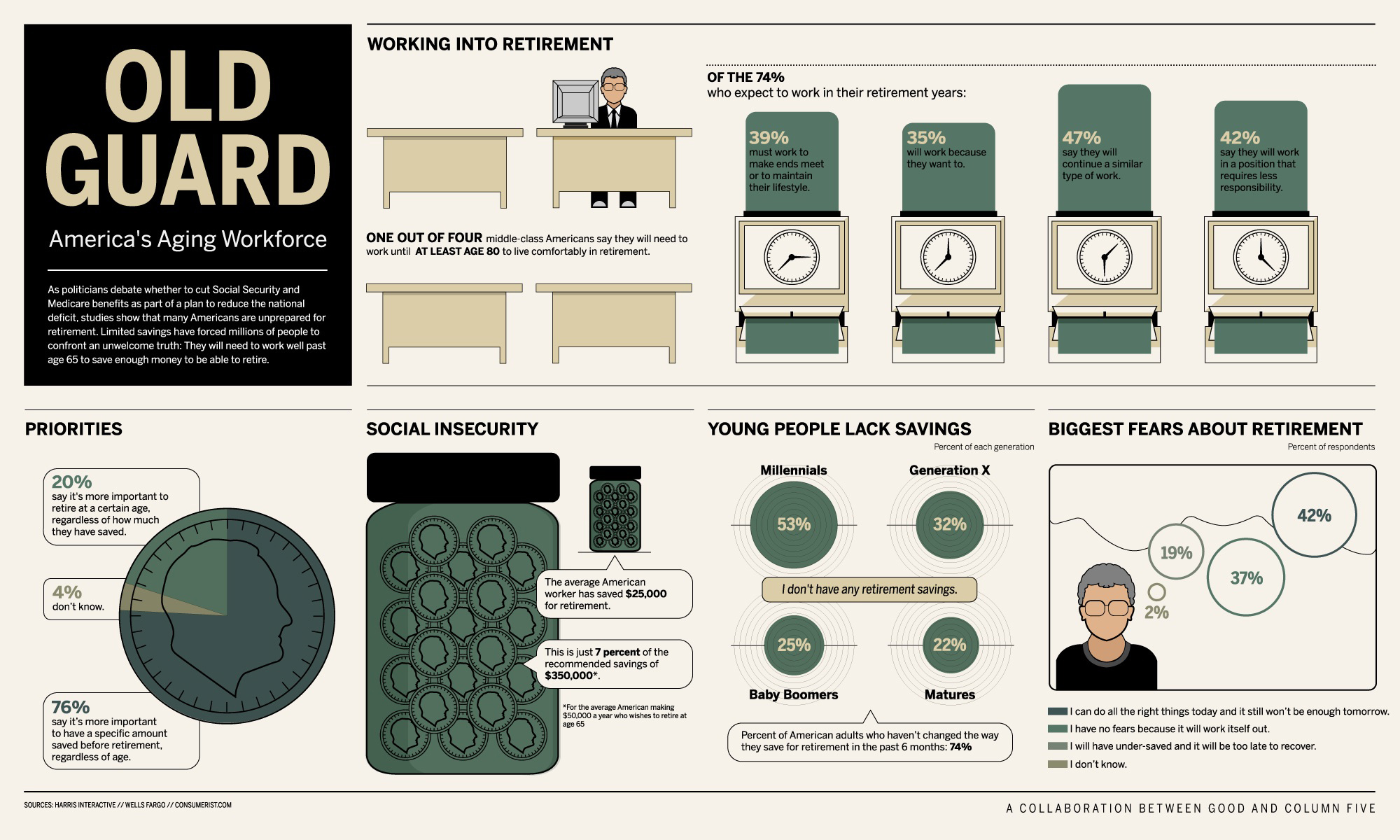
Yesterday, GOOD issued an infographic of America’s Aging Workforce (reproduced below). One of the key learning I take from it is that many Americans are unprepared for retirement. Indeed, the average American worker has saved $25,000 for retirement but it is estimated she/he will need $350,000 if she/he wishes to retire at 65 (i.e. 14 times more money!).
I was also wondering: after China and Belgium, how will the population age in the USA?
The US Census Bureau maintains national projections of the population and its latest data is from 2009. Among other things, it takes into account the resident population and demographic components of change (births, deaths, and net international migration). For international migration (in and out of the USA), there are four alternative assumptions (described in the method statement):
in the High Net International Migration scenario, they increase the previously projected net international migration by a fixed ratio ;
in the Low Net International Migration scenario, they decrease the same previously projected net international migration by the same fixed ratio ;
the Constant Net International Migration scenario illustrates the effect a level trend in international migration would have if maintained over the projection period ;
finally, in the Zero Net International Migration, the number of immigrants and emigrants is held constant at a value of zero for the entire projection period, thus assuming a closed population and no movement of individuals into or out of the United States.
By proceeding in this way, the overall number of migrants projected to enter or leave the population is (optionally) modified while maintaining the assumptions about the distributions of demographic characteristics.
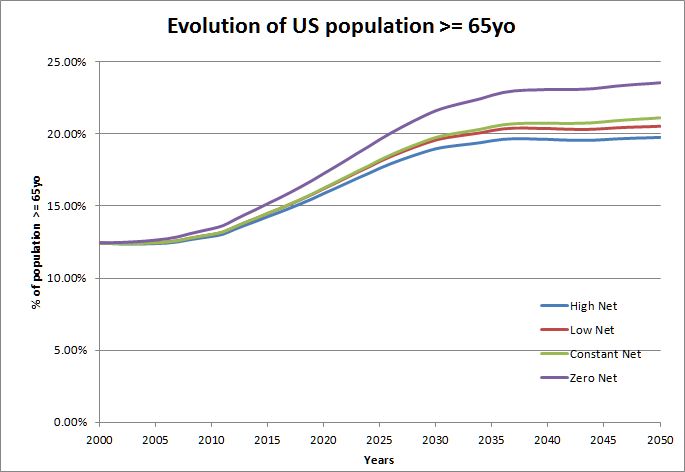
Now, as expected, the American population is indeed aging. From approximately 12% in 2000 the population above 64 years old will increase to more than 21% in 2050 (in the constant scenario, see below). We also see an acceleration of the increasing number of elderly in the USA between 2010 and 2030. This US estimation is a bit lower than the estimations for China (>23%) and Belgium (>25%).
In the graph above, I took the Constant Net International Migration scenario as I consider it as the most conservative. When one plots all the scenarii, we can see the difference is not so big: the US population above 64 years old in 2050 will be between 19% (High scenario) and 23% (Zero scenario) of the total US population (see below).
The main issue remains to maintain older people as much as possible the same levels of health and independence as they enjoyed during their active lives. As highlighted by GOOD, America’s workforce will need to work well past age 65 to save enough money for retirement.
Indeed: 2011 was the International Year of Chemistry (IYC). But why IUPAC and UNESCO dedicated a year to that basic science? It was for two reasons: one looking at the past and one looking at the future.
Looking at the past, 2011 was the 100th anniversary of Marie Curie‘s Nobel Prize in Chemistry for her discovery of the elements radium and polonium. She was the first woman to be awarded a Nobel Prize. And her discovery was very important for both the science in itself and its applications to health. Radium’s radioactivity seemed to contradict the principle of the conservation of energy. The discovery of radium allowed other great names in chemistry and physics like Rutherford to study the atom and radioactivity decay. In medicine, the radioactivity of radium allowed the development of radiation therapies, used to control or kill malignant cells in cancer treatment.
But 2011 was also the 100th anniversary of the first Solvay conference which subject was “Radiation and the Quanta”. Marie Curie was obviously present, along with Henri Poincaré, Max Planck, Ernest Rutherford and Albert Einstein among others. It was held at the Hotel Metropole, in Brussels (yes, in Belgium 🙂 ). Solvay conferences in physics and chemistry still continue now.
1911 Solvay conference
So IUPAC and UNESCO wanted to commemorate the achievements of chemistry and its contributions to the well-being of humankind in general. And 2011 was full of activities all over the world (there was probably one near your place and there are still plenty of activities prepared for 2012!).
One of these activities was the creation of a team of young people/scientists who debated and introduced their ideas and expectations from life sciences and chemistry, industry and governments to build a better world in 2050. I am grateful to my company to have chosen me to represent it in this “Young Leader” team: it really was a great experience!
Every member of the team came from different horizons (Europe, Asia, America, Africa) with different backgrounds all related in a way or another to chemistry (but it’s true that we were mostly chemists and engineers). We started by the simple statement that “chemistry is everywhere and for everyone“. It’s quite obvious but if we are often reminded of the negative impacts of chemical products and chemical reactions, chemistry also enabled billions of applications and made possible to feed more people, give them shelters and potentially a better health. It’s not roses all the way ; mankind has lots of efforts and progress to make. But if you think of the computer you are using to read this post, for instance: it’s working thanks to thousands of chemical compounds and chemical reactions. And on top of that, chemistry is also a natural process (well, first, it’s a natural process). When you eat your breakfast, when you listen to a lecture, when you attend a meeting, when you practice some sport, when you meet friends, when you sleep, you are full of chemical reactions, using thousand different chemical elements.
But as the world is facing important challenges like overpopulation, energy depletion, pollution, etc. or simply because people want to make their lives better it’s also true that chemistry is our future and will play a role in tackling these issues. But instead of depicting a sad, pessimistic view of these issues and just enumerating technical solution chemistry is or will be designing, the team decided to work on a vision for 2050 and ways towards this vision:
By 2050 we must all have access to healthy, safe and fulfilled lives in symbiosis with our planet
With concrete examples of existing or budding chemical technologies and solutions allowed by the development of chemistry, we wrote three concrete stories of people who would have made a change in the future. Most megatrends were debated, lots of research was done to find scientific evidences of change or application. Better water distribution and usage, smarter housing, increased yields for locally produced food, more efficient energy production and storage mechanisms were among the topics we discussed. Health was also present as education, biotechnologies (like new delivery and detection methods), collaborations and policies also play a key role, with chemistry as a pervasive partner.
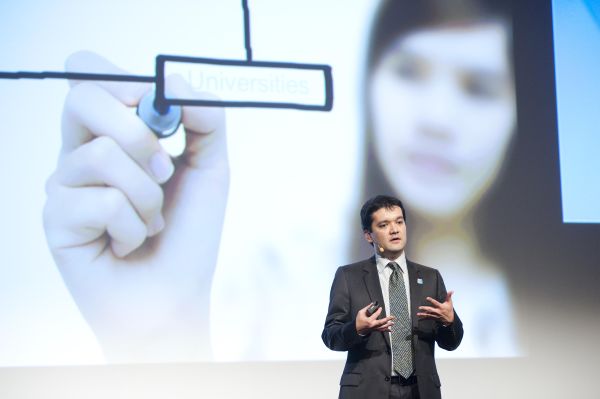
A milestone for the group was the Closing Ceremony of the IYC that was held in Brussels, on December 1st, 2011. We had to transmit that vision, the way we think it can be achieved to students and members of the chemistry community. It was a great pleasure to see the high level of interest and, for most of them, of passion the young students have towards Chemistry. Their questions, their curiosity about the future, their questioning of the implementation of our vision as well and their thirst of knowledge were amazing. It was also very, very interesting to listen to Ada Yonath’s talk about ribosomes but also science, curiosity and her passion. Professor Jean-Luc Brédas, Francqui Prize in 1997, also gave a very interesting talk about new and more efficient energy sources. Finally, the debate, the round table between main actors in the world of chemistry, the ideas, comments, discussions that followed were all very instructive and enlightening.
Fortunately this is not the end. All these ideas and discussions will definitely feed discussions and our efforts to maintain a platform for chemistry and its ways to help for a better future. We already started with a Facebook group. Central science created special topics about IYC activities. Nature created an IYC website with dozens of articles about everything from research to careers. And I hope to be able to write again about other initiative and, of course, about the fulfillment of our vision in 2050 (or even before!).
Photo credits: Marie Curie, from Scientific American by Wyoming_Jackrabbit (CC-by-nc-sa on Flickr). The photo of the Solvay conference was taken by Benjamin Couprie and from wikipedia. Photos of the YL group and the closing ceremony are from Vivian Hertz.







 Jean-Etienne's blog
